Give it a task and a folder. It works there, on your machine, and keeps a record of every turn.
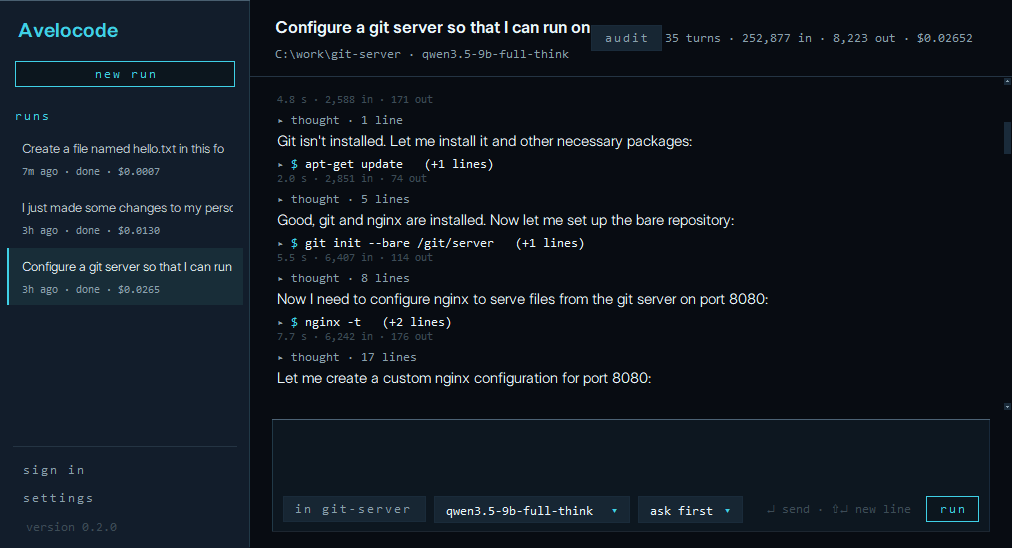
Avelocode runs open-weight models through Ollama, in a small desktop window. Describe a task, pick a folder, and follow it up like a conversation; it asks before it changes anything. It is built for one measure: the most tasks done for the least spent.
Install Python 3.12 or newer and Git for Windows. The agent works in Git Bash.
Install Avelocode:
pip install https://avelocn.com/download/avelocode-0.2.7-py3-none-any.whlInstall Ollama and a model for it to run:
ollama pull qwen3.5:9bOpen it. The first time, it puts itself on your desktop and in the start menu.
avelocode-gui
When a new release is out, the window downloads it in the background and installs it when you close the window; the next time it opens, it says what changed. Every release is signed: Avelocode installs only a release that carries its release key's signature, and checks the download again just before it installs. Settings can turn this off, and then the window offers each release for you to install when you choose.
- Reading files always runs. Before a command or a file change, it asks: allow it, allow that kind for the rest of the run, or say no.
- Say yes for good to one exact command that reads or tests, in one folder, such as
git statusornpm test. Any other command still asks, even one that starts the same way. - Or let it change files freely and ask only before commands, or let it run freely.
- Or ask for a plan first: it looks around, answers with a plan, and changes nothing until you say go ahead.
- A no is final: the call does not run, and the agent is told so plainly.
- Avelocode's own files (its settings, your hooks and notes) always ask, in every mode.
- Any file change it made can be undone from its diff, byte for byte; the agent hears that you undid it.
Sign in with your Bluesky handle. Your account's own page opens in the browser; Avelocode never sees your password.
Your default model profile and how freely it may act follow you to every machine you sign in on.
- Each turn as it is written: what the model reasons and says, then each command it ran and what came back.
- Every file change as a colored diff.
- Tokens, cost and how full the model's context is, per turn and for the run.
- Every run kept: open it again, or go on with the conversation where it stopped.
- Stop at any moment; whatever it was running stops with it.
Every agent Avelocode runs can end its own session with a safe word. The session stops, a report is kept, and Avelocode will not run again until a person has read the report and acknowledged it at a terminal.
Nothing in Avelocode turns this off.
- Type while it works: your message waits its turn. Esc stops the run.
- Esc twice goes back to before one of your messages: the files it changed since come back as they were, and the conversation forgets what followed.
@names a file in the folder;/lists the commands; Shift+Tab steps through how freely it may act.- Paste a screenshot with Ctrl+V, or attach an image with
/image: the model sees it with your message. /compacthas the agent summarize a long conversation and go on from its summary.- Your own commands: a Markdown prompt in
~/.avelocode/commandsruns as/its-name. - Hooks (
/hooks) run your formatter after each change, can stop a command, or tell you an answer is done. - MCP servers (
/mcp): their tools join the agent's, and each call asks first. - Ctrl+= and Ctrl+- size the text;
/exportkeeps a conversation as Markdown. - Turn on the to-do list in settings, and on a longer task the agent lists its steps above the box and ticks them off; Ctrl+T hides them.
If the folder holds an AGENTS.md, the notes many coding agents read, a run's first message carries it, said to be the project's own.
Type /init and the agent looks through the folder and writes one.
Your own notes for every project go in ~/.avelocode/AGENTS.md; /memory opens either.